Track
Track
 Login
Login


Astro
Updates
Campaign Period
4 March 2026 - 4 December 2027
Change Mesh Connection for RG21 Wired Users
- Ensure your Router and Mesh are paired.
- Check the LED indicators on the front panel of both devices. The INT or WPS LED should be turned on.
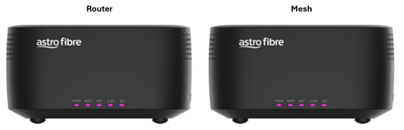
- Figure 1 WPS and INT LED on Router and Mesh
- Check the LED indicators on the front panel of both devices. The INT or WPS LED should be turned on.
- Check current cable connection on the mesh
- At the moment, the cable should be connected from LAN port of the router to WAN (blue) port of the mesh.
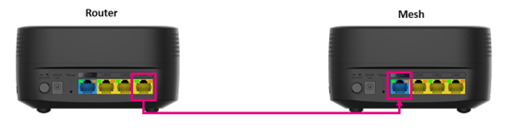
- Figure 2 LAN Yellow Port (Router) -> WAN Blue Port (Mesh)
- At the moment, the cable should be connected from LAN port of the router to WAN (blue) port of the mesh.
- Change the cable connection on the mesh
- Remove the cable from WAN (blue) port of the mesh and plug it into any LAN (yellow) port off the mesh.
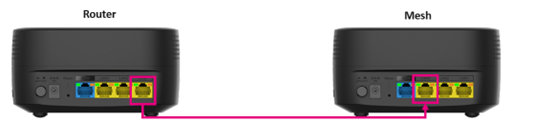
- Figure 3 LAN Yellow Port (Router) -> LAN Yellow Port (Mesh)
- Remove the cable from WAN (blue) port of the mesh and plug it into any LAN (yellow) port off the mesh.
- Verify the LED status
- If the LEDs do not turn on, please reboot the mesh and wait for the lights to stabilize.
- The WPS and INT LEDs on the front panel of mesh should remain turned on.