Track
Track
 Login
Login


Upon downloading the Astro Smart TV app, what do I do next?
If you are an Astro subscriber
Step 1: Launch the Astro Smart TV app on your Smart TV.
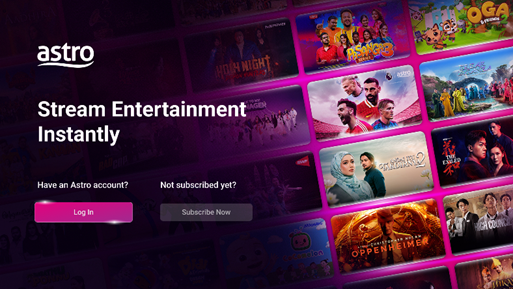
Step 2: Select “Log In”.
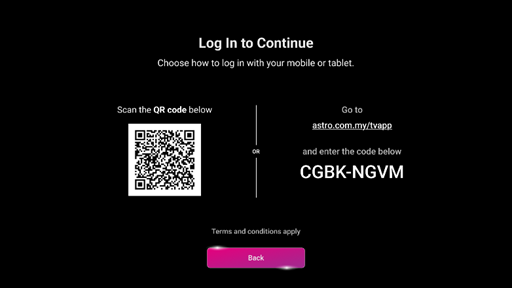
Step 3: Scan the QR code OR visit astro.com.my/tvapp and enter the code on the screen.
Step 4: Enter your Astro ID (registered email or mobile number) and password. If you do not have an Astro ID, click on “Create now”.

Step 5: Once you have successfully logged in, the Astro Smart TV app will refresh automatically, and you will be able to access it.
If you are NOT an Astro subscriber
Step 1: Launch the Astro Smart TV app on your Smart TV.
Step 2: Select “Subscribe Now”.
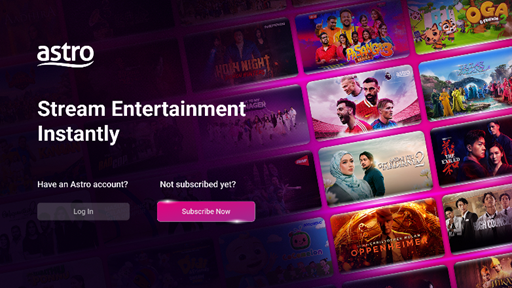
Step 3: Scan the QR code to visit https://www.astro.com.my/#main and explore Astro’s packs or Multiroom (Smart TV).
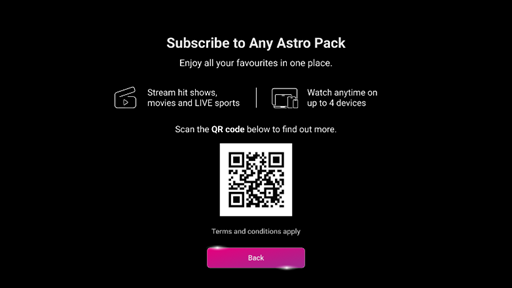
Step 4: Once you have successfully subscribed, kindly follow Step 1 – 5 under “If you are an Astro subscriber” to log in.
Similar Articles