Track
Track
 Login
Login


How do I opt-in for e-invoicing?
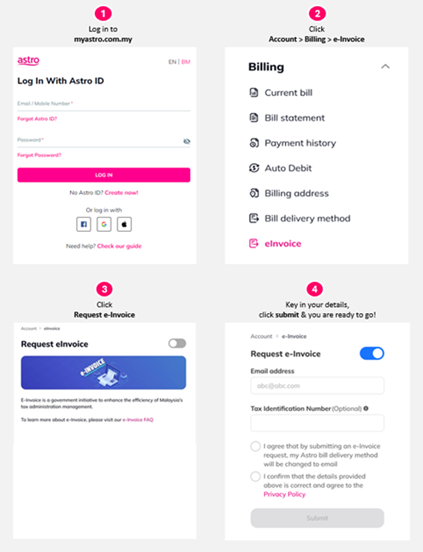
You can opt in to e‑Invoicing via the My Astro website or the My Astro app by following the steps below. Depending on your profile, you may be asked to provide additional details. Please scroll down to review the information required before proceeding.
Via the My Astro website:
- Log in using your Astro ID.
- Click Bills, scroll down to e-Invoice, and toggle it on.
- You may need to enter your information (scroll down for more info) and click Acknowledgement to confirm.
Via the My Astro app:
- Log in using your Astro ID.
- Tap your account number or the default profile icon at the top left.
- Scroll down to the Billing section, select e-Invoice, and turn the toggle on.
- You may need to enter your information (scroll down for more info) and click Acknowledgement to confirm.
Details you may be required to provide:
The information required depends on your customer profile.
For Malaysians with NRIC 12 digits format (i.e. MyKad, MyTentera, MyKAS, MyPR) | Email (Mandatory) TIN Number (Optional) - We strongly advise you to provide your TIN number to facilitate the e-invoice issuance process. |
For Malaysians with NRIC, not 12 digits format | Email (Mandatory) NRIC Number (Mandatory) TIN Number (Optional) - We strongly advise you to provide your TIN number to facilitate the e-invoice issuance process. |
For Non-Malaysian Individuals | Email (Mandatory) TIN Number (Optional) - We strongly advise you to provide your TIN number to facilitate the e-invoice issuance process. |
Note: You may obtain your TIN from the MyTax Portal or visitthe nearest IRBM branch
Similar Articles