


 Jejak
Jejak
 Log masuk


Qalbox







Watch Qalbox on Astro


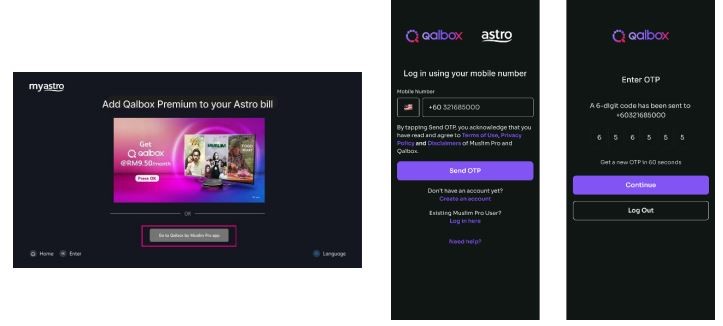
Step 2
Log in with the same registered mobile number that you used to purchase Qalbox

Step 3
Yay! You can start streaming now. Cancel your add-on subscription anytime
Recommended add-ons to enjoy Qalbox
Subscribe to monthly Qalbox plans to upgrade your existing pack. Cancel anytime.
New to Astro? Find your bundles here
Get stable endless entertainment with Qalbox app added on for more variety. Cancel your add-on anytime.
Hiburan serta-merta
Entertainment + Qalbox by Muslim Pro
RM48.79
/bln-
Tiada pemasangan Astro Box diperlukan
- Strim sehingga 2 skrin (maksimum 1 Smart TV)
-
Bil bulanan










Aksi sukan serta-merta
Sports + Qalbox by Muslim Pro
RM78.79
/bln-
Tiada pemasangan Astro Box diperlukan
- Strim sehingga 2 skrin (maksimum 1 Smart TV)
- Bil bulanan











Hiburan terbaik
Entertainment + Qalbox by Muslim Pro
RM58.79
/bln

Sukan terbaik
Sports + Qalbox by Muslim Pro
RM78.79
/bln
Astro X3
Astro One


Astro X3: Entertainment 12 Pack
RM39.99
/bln
Kandungan pek anda

Astro GO

Aplikasi Smart TV

Asas


Astro X3: Sports 12 Pack
RM69.99
/bln
Kandungan pek anda

Sun NXT Lite

beIN SPORTS CONNECT
Astro GO
Aplikasi Smart TV

Sports

Sports Extra
Asas
Astro One: Entertainment Pack
RM49.99
/bln
Kandungan pek anda
Astro GO
Asas
Astro One: Sports Pack
RM69.99
/bln
Kandungan pek anda
Sun NXT Lite
beIN SPORTS CONNECT
Astro GO
Sports
Sports Extra
Asas
Frequently asked questions
Qalbox by Muslim Pro is a Muslim-friendly entertainment streaming service that is accessible via the Muslim Pro app. It hosts an extensive library of content that celebrates Muslim identities and cultures worldwide and aims to create a global platform for Muslim creatives and filmmakers.
Muslim Pro is the go-to Muslim lifestyle app, recognised by millions of Muslims globally ashaving the most accurate prayer time and athan/azan application for salah (prayer). Muslim Pro has a full suite of features that help Muslims practise their religion and deen more purposefully with features such as a Qibla finder, reading and listening to the Quran, a digital tasbih and more.Meanwhile, Qalbox is a streaming service by Muslim Pro to enjoy Muslim-friendly movies, TV series, animations and more. After purchasing Qalbox as an add-on, Astro customers can stream the app on their Ultra/Ulti Box,
www.qalbox.com
or via the Muslim Pro mobile app.
At the moment, offline downloading of content is not available.
Yes, simply download the Muslim Pro app and log in using your registered mobile number for Qalbox. You may be required to provide your email address and password for additional security. Once done, you may access Qalbox immediately.
Please reach out to the Qalbox team by emailing them at [email protected] if you have any enquiries or require assistance with the app.If you would like to contact Astro, you may reach out to our Customer Service Centre by:
1. Submitting a feedback form here: www.astro.com.my/contactus/form; or
2. Reaching to us via WhatsApp by typing "Hi" at 03-9543 3838 for assistance.
Yes, you can! Just follow these simple steps to stream your Qalbox account on your Ultra/Ulti Box:
Step 1: Open œQalbox by Muslim Pro under the Apps rail at your Box home page.
Step 2: Select œGo to Qalbox by Muslim Pro app then scan the QR code on screen to log in to your existing account.
Step 3: Finally, enter the pairing code displayed on your TV screen to pair your account to your Ultra/Ulti Box.